Specifications
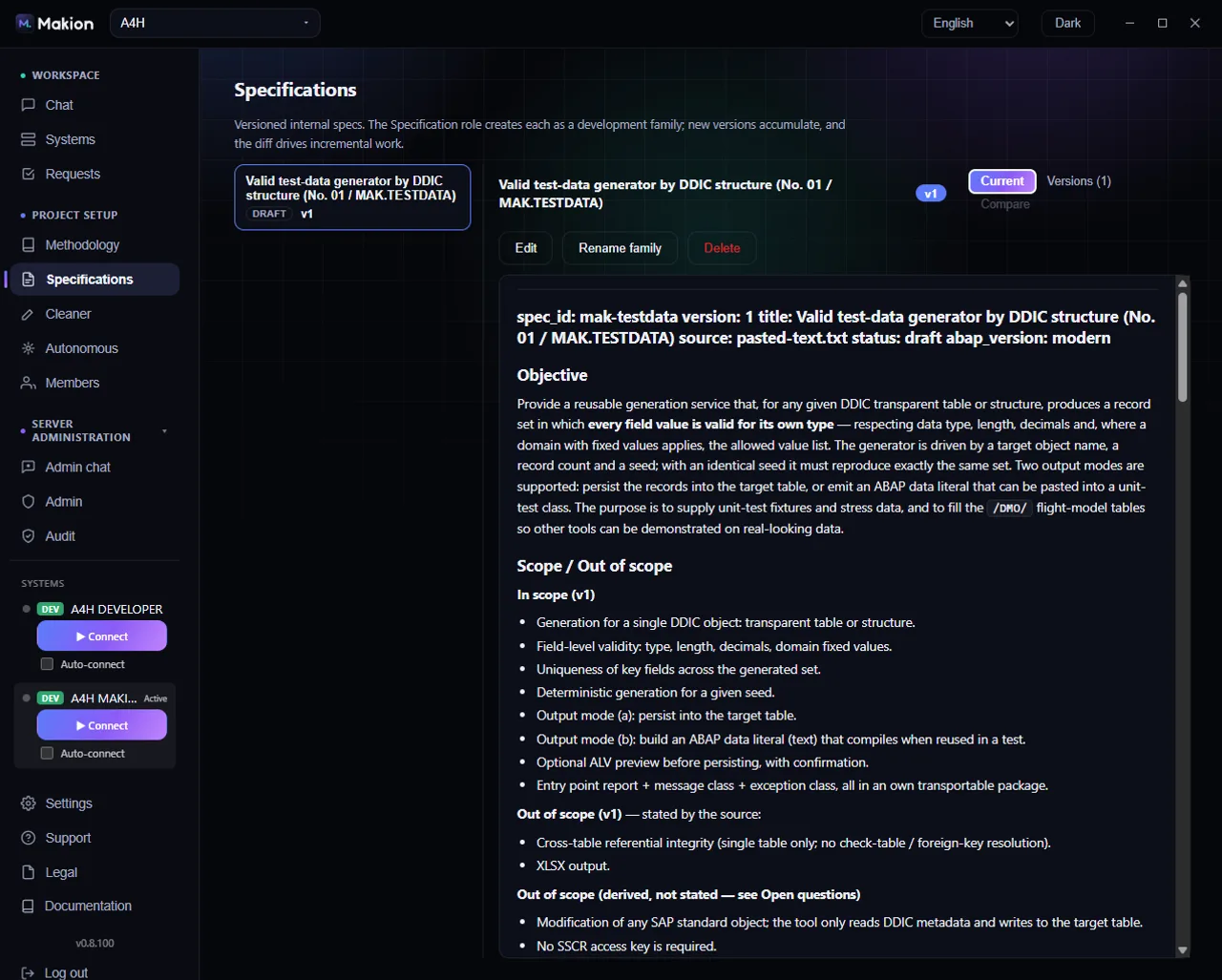
The Specs tab holds development specifications — normalized, versioned descriptions of a development that both the agent and the humans on the team work from. A spec is the shared source of truth for a piece of work: what is being built, why, and to what rules. Specs are produced by the Specification role in Chat — see Developer roles.
What a specification is for#
A spec turns a loose requirement into a normalized, versioned description the agent can implement against and a human can review. Each specification is a family with a stable spec_id that stays the same across every version — so as the spec evolves, its history is one continuous thread, and links to it never break. When you hand the agent a spec to implement (including in Autonomous mode), it works from that stable, versioned definition rather than a one-off chat message.
The spec list#
The left side lists your spec families. Each entry shows:
- The spec title.
- A status badge.
- v{version} — the current version.
- {n} versions — how many versions exist.
When a project has no specs yet, the list shows:
No specifications yet — use the Specification role in Chat to create one.
Pick a family on the left to open it.
The family view#
Opening a family shows three sub-tabs:
| Sub-tab | What it shows | When it's available |
|---|---|---|
| Current | The current version, rendered from Markdown | Always |
| Versions (N) | Every version, with per-version change summaries | Always |
| Compare | A side-by-side diff between two versions | Only with 2 or more versions (disabled otherwise) |
Current#
The Current sub-tab renders the latest version of the spec as formatted Markdown. Admins get controls to manage the spec:
| Control | What it does |
|---|---|
| Edit | Open the current version for editing. |
| Save | Save your changes. |
| Cancel | Discard your changes and leave edit mode. |
| Rename family | Change the spec's title. The spec_id stays the same. |
| Delete | Delete the whole family and all its versions. |
Delete removes the entire spec family — every version, not just the current one. There is no per-version delete; this is all-or-nothing.
Versions (N)#
The Versions sub-tab shows the full history:
- A version rail listing every version by tag. A version that has a change summary is marked with a dot.
- A "Changes in v{v}" box describing what changed in the selected version.
- The content of the selected version.
Use this to read any past version exactly as it was, and to see the narrative of how the spec evolved.
Compare#
The Compare sub-tab shows a diff between any two versions. It needs at least two versions to be available.
| Control | What it does |
|---|---|
| From | Select the base version to compare from. |
| To | Select the version to compare to. |
| Diff view | Shows additions and removals with a + / − gutter. |
| "What changed" box | A summary of the differences between the two selected versions. |
How specs are created#
You do not hand-write specs from scratch here — you generate them with the Specification role in Chat. Describe the requirement to the agent in that role and it produces a normalized spec, which then appears as a family on this tab. Admins can refine it afterward with Edit / Save, and each meaningful change becomes a new version with its own change summary.
Where to go next#
- Developer roles — including the Specification role that produces specs.
- Chat — where you pick a role and create a spec.
- Autonomous mode — hand the agent a spec and let it work unattended.
- Methodology — the rules and knowledge the agent applies while implementing a spec.