Methodology
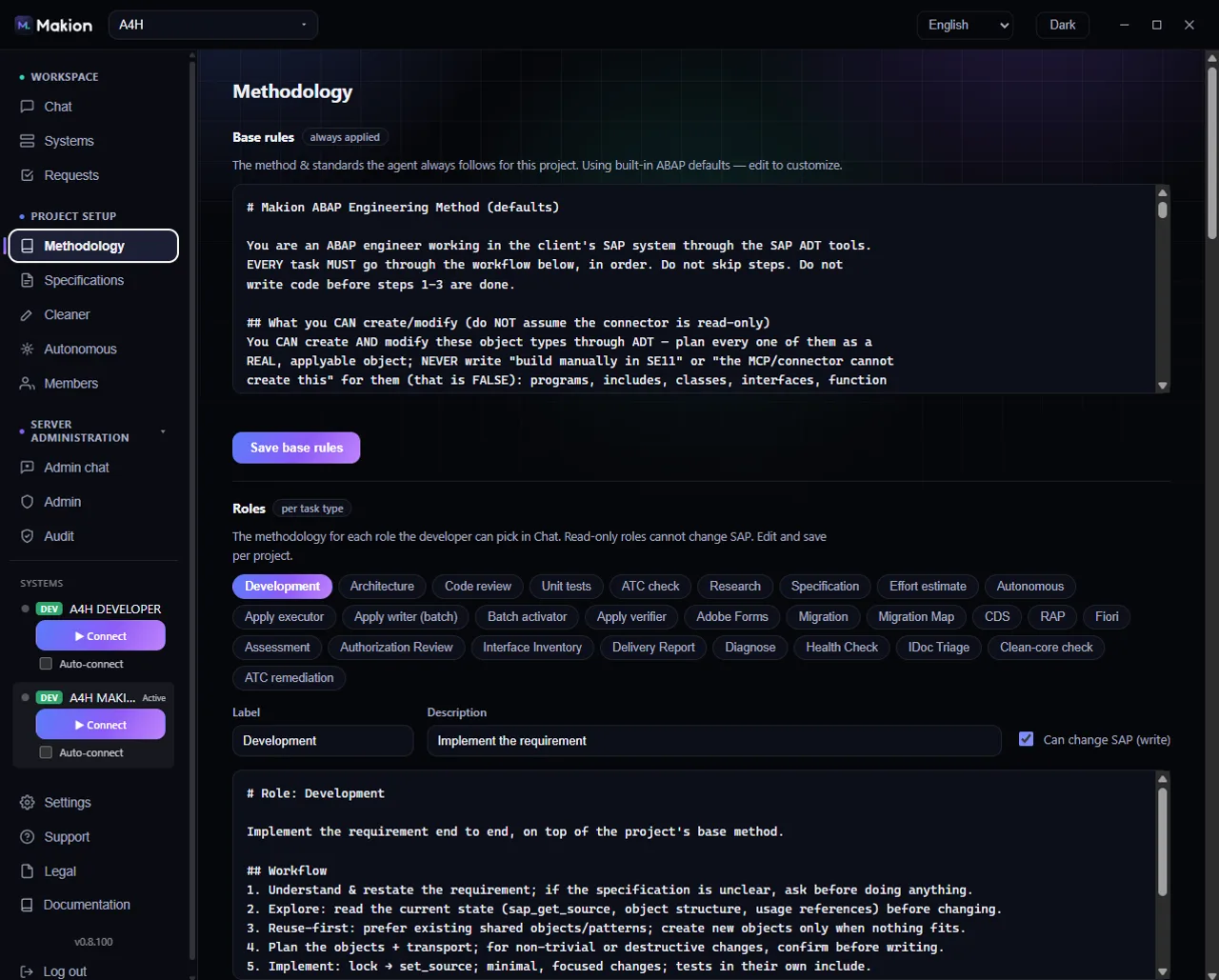
The Methodology tab is where an admin defines how the agent works on a project — the standards it always follows, the methodology for each role, and the reference files it reads on every run. This is how you make Makion follow your team's exact way of working, in your words, instead of generic ABAP defaults.
Everything on this tab is editable only by a project admin or superadmin. Everyone else sees the tab in read-only form with the note "Read-only — an admin edits these." so they can see the standards the agent is held to without being able to change them.
Methodology is per project. If two teams work on different SAP systems with different standards, give them separate projects — see Configuring projects — and tune each project's methodology independently.
How the layers combine#
Makion steers the agent from three layers at once. On every run they are combined into the context the agent works from:
- Base rules — always applied, for every task in the project.
- The picked role's methodology — the system prompt for the role the developer selected in Chat (for example a build role vs. a read-only review role).
- Knowledge-base files — standards and examples that are materialized into the agent's context on every run.
So a single request is shaped by base rules + the role you picked + the knowledge base, together. Base rules set the ground truth for the whole project; the role narrows it to the task type; the knowledge base supplies the concrete patterns and examples.
The three blocks#
| Block | What it holds | Who can edit |
|---|---|---|
| Base rules | The method & standards the agent always follows for this project | Project admin / superadmin |
| Roles | The methodology for each role the developer can pick in Chat | Project admin / superadmin |
| Knowledge base | Files the agent reads when working | Project admin / superadmin |
Base rules#
Base rules are the method and standards the agent always follows for this project, no matter which role is picked. A status line tells you where the current rules come from:
- "Customized for this project." — the project has its own base rules.
- "Using built-in ABAP defaults — edit to customize." — the project is still on Makion's built-in ABAP defaults; edit them to make them yours.
| Control | What it does |
|---|---|
| Base rules textarea | A large editor holding the full base-rules text the agent always applies. |
| Save base rules | Saves your edits and switches the status to "Customized for this project." |
Write base rules in plain language: naming conventions, clean-core expectations, transport discipline, review habits — whatever the agent must respect on every task.
Roles#
The Roles block defines the methodology for each role the developer can pick in Chat. A role is both a permission boundary and a way of working: read-only roles cannot change SAP, and that limit is enforced in the tools the agent is given, not just described in text. For the full picture of how roles scope the agent, see How roles work and Developer roles.
Roles appear as tabs — one per role. A customized role shows a "custom" tag so you can tell at a glance which roles you have tailored and which are still on defaults.
For the selected role you can edit:
| Control | What it does |
|---|---|
| Label | The role's display name, as it appears in the Chat role picker. |
| Description | A short line describing when to use this role. |
| Can change SAP (write) | Whether this role may write to SAP. Unchecked = read-only: the agent is handed only read tools and physically cannot change SAP. |
| Content textarea | The role's methodology / system prompt — how the agent should approach this task type. |
| Save role | Saves the label, description, write flag and content for this role. |
| Reset to default | For a customized built-in role, restores Makion's shipped default. Removes the "custom" tag. |
Can change SAP (write) decides whether the agent can modify your system in this role. Leave it unchecked for anything that should only investigate or review. Read-only means read-only — the write tools are never passed to the agent.
Tuning roles is the highest-leverage part of the Methodology tab: it is how an admin encodes "this is exactly how we build, review, and support ABAP" into every conversation. Start from Configuring projects when standing up a new project's methodology.
Knowledge base#
The Knowledge base holds files the agent reads when working — your standards, patterns, and worked examples. These files are materialized into the agent's context on every run, so anything you put here is reference material the agent can rely on directly.
Every project also starts with a built-in pack that ships with the server, materialized at knowledge/abap-core/: the shared foundation library, the project standards, reusable patterns, and the rules for writing to the ABAP repository safely. It is always present, it updates when the server updates, and a file of your own at the same path takes precedence over it.
| Control | What it does |
|---|---|
| File list | All knowledge files for the project, by path. |
| Add | Create a new file. Give it a path like knowledge/patterns/my-rule.md. |
| Editor | The content of the selected file. |
| Edit | Open the selected file for changes. |
| Save | Save the current file's content. |
| Delete | Remove the selected file from the knowledge base. |
Use folders in the path (for example knowledge/patterns/… or knowledge/examples/…) to keep the base organized as it grows. Good candidates: a canonical "how we structure a report" example, a preferred error-handling pattern, a naming cheat sheet, a checklist the agent should run through before finishing.
Base rules are best for short, always-true principles. The knowledge base is best for longer reference material and concrete examples the agent should imitate. Together they let you "grow the standard" over time without bloating the base rules.
Where to go next#
- How roles work — how a role scopes what the agent can and cannot do.
- Developer roles — the built-in roles and what each is for.
- Configuring projects — standing up a project and its methodology.
- Specifications — versioned development specs the agent works from.