How the cleaner works
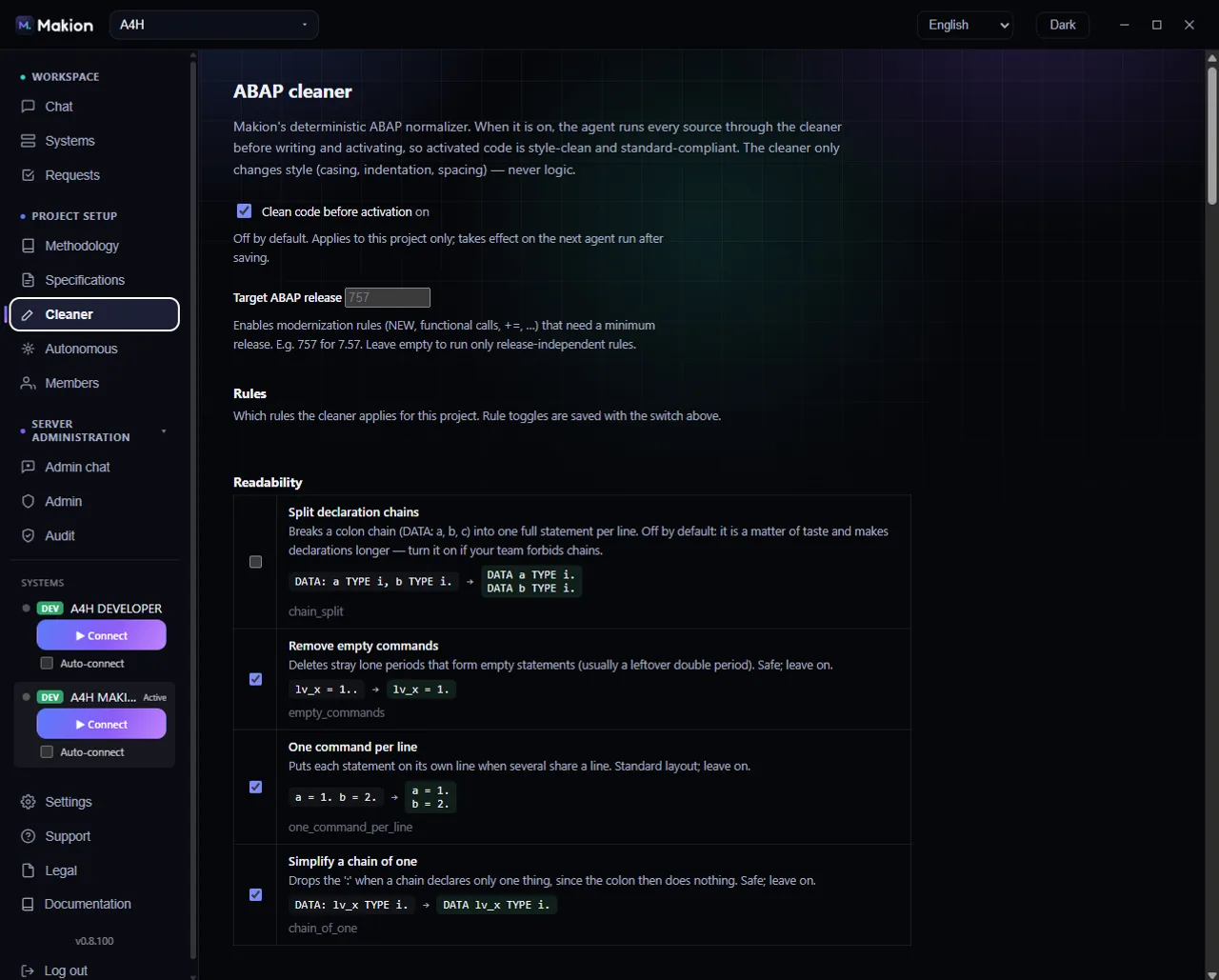
The ABAP cleaner is Makion's own code formatter and normalizer. It is deterministic and behaviour-preserving: it only changes whitespace, casing, line breaks, and safe token modernizations, and it never changes what the code does. The cleaner runs through the SAP tool during a task, before the agent writes or activates an object.
Configure it in the ABAP cleaner tab, which is visible to a project admin. Everything you set here applies to this project only.
What the cleaner does — and does not do#
The cleaner rewrites the form of ABAP, never its meaning. It can re-indent statements, normalize keyword casing, tidy spacing and blank lines, align declaration columns, and apply safe modernizations (for example turning MOVE src TO tgt. into tgt = src.). Every rule is behaviour-preserving by design — see the full catalog in the Cleaner rules reference.
The cleaner is never run on CDS / DDLS / DDLX / SRVD objects. Reformatting those would mangle their annotations. It applies to ABAP source only.
Turning the cleaner on#
The Clean code before activation master checkbox is the on/off switch for the whole cleaner in this project. It is OFF by default.
When it is ON, a per-task Clean this task checkbox appears in the Chat composer, so you can decide to run the cleaner for a single task. With the master switch off, the cleaner never runs and that checkbox is hidden.
Tab controls#
| Control | What it does |
|---|---|
| Clean code before activation | Master checkbox. OFF by default. When ON, enables the cleaner for this project and reveals Clean this task in the Chat composer. |
| Target ABAP release | Number input (e.g. 757; range 700–799). Gates the modernization rules — some rewrites need a minimum ABAP release, and will not fire on a lower target. |
| Rules | The rule catalog, grouped by category. Each rule has a checkbox, a name, a description, a before → after example, and a rule id. Disabled unless the master switch is on. |
| Save | Saves the cleaner configuration for this project. |
Target ABAP release#
Some modernizations only exist from a given ABAP release onward — for example, constructor expressions like NEW need 7.40, and compound assignments like x += n need 7.54. The Target ABAP release value tells the cleaner which release you are targeting so it only applies rewrites your system can compile. Set it to your system's release.
Rules#
The Rules catalog is grouped by category — Casing, Declarations, Layout, Spacing, Alignment, Comments, Whitespace, Modernize, and Readability. Each rule is individually toggleable and configurable through the project's profile. With no profile, each rule's built-in default applies. The rule controls are disabled unless the master switch is on.
For the complete list of all 45 rules — what each one does, its default, and its group — see the Cleaner rules reference.
Running it for a task#
- In the ABAP cleaner tab, turn on Clean code before activation and pick the rules you want.
- Set Target ABAP release to your system's release.
- Click Save.
- In Chat, tick Clean this task on the task you want cleaned. The cleaner runs before the agent writes or activates the object.
Because the cleaner is behaviour-preserving, it is safe to leave enabled — it will tidy and modernize the code the agent produces without changing what it does. Tune individual rules to match your team's house style.
Related pages#
- Cleaner rules reference — all 45 rules, grouped, with defaults.
- Chat — where the Clean this task checkbox appears.
- Specifications — task inputs the agent works from.